

The Negative Keyword Nightly Hunt is your primary defense against wasted ad spend. This automation scans your search term reports every night to identify unprofitable or irrelevant terms and automatically adds them as negative keywords, ensuring you only pay for traffic that converts.
Accessing the Negative Nightly Hunt
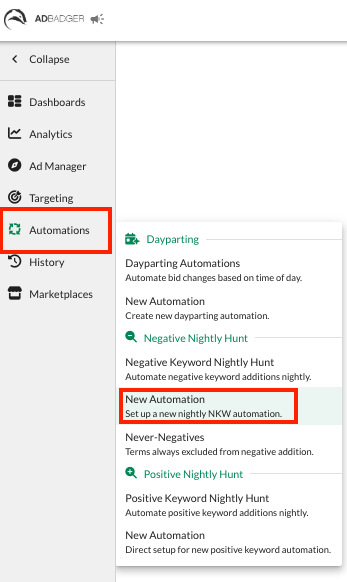
Navigate to the Automations tab in the left-hand sidebar.
Under the Negative Nightly Hunt section, select New Automation.
Creating Your Automation
You can build your "hunt" using one of our strategic templates or by creating your own rules from scratch.
Option 1: Use a Pre-Filled Template
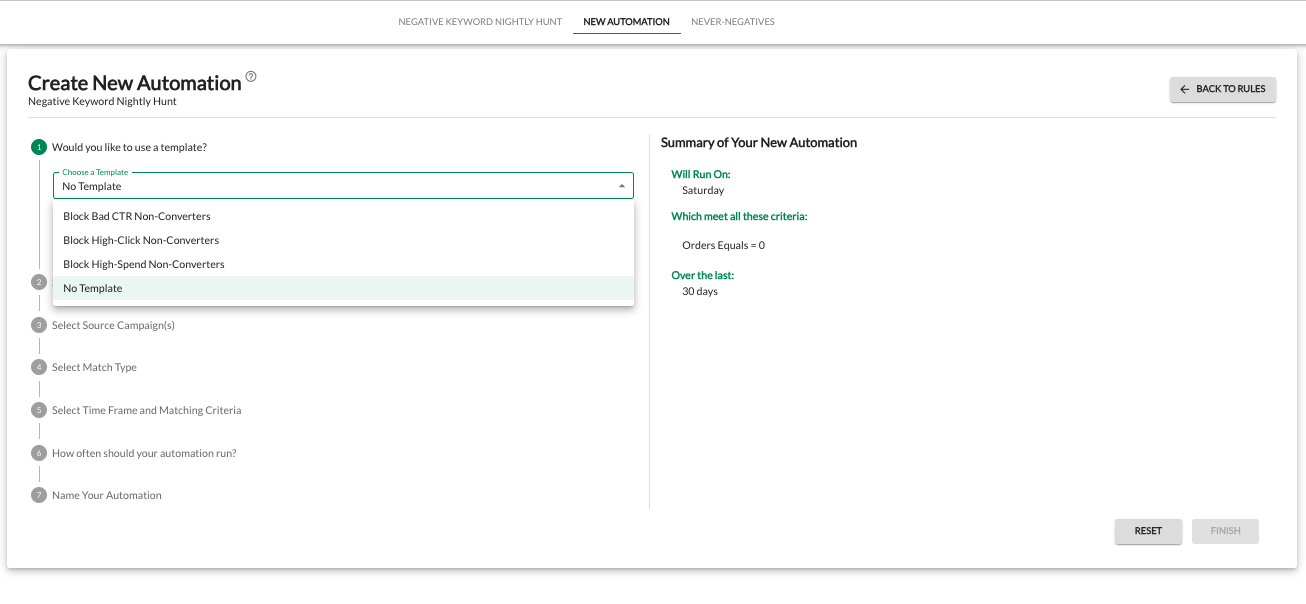
Ad Badger offers three data-driven templates to help you catch "bleed" quickly:
Block Bad CTR Non-Converters: Targets terms with high impressions and clicks but zero sales.
Block High-Click Non-Converters: Targets terms that have reached a specific click threshold without a conversion.
Block High-Spend Non-Converters: Targets terms that have spent a significant amount of your budget without generating revenue.
Selecting a template pre-fills the logic, allowing you to jump straight to choosing your source campaigns.
Option 2: Custom Rules (No Template)
For total control, select No Template to walk through the 7-step setup:
Select Level: Choose whether to apply the negative at the Ad Group or Campaign level.
Select Source Campaigns: Pick which campaigns the tool should monitor.
Select Match Type: Choose Negative Exact (blocks the specific phrase) or Negative Phrase (blocks any search containing that phrase).
Time Frame and Criteria: Define your "rules for failure." For example, look back over the last 30 days for any term with Orders Equals 0 and Spend Greater than $15.
Frequency: Choose which days of the week the automation should run.
Name Your Automation: Give it a clear name (e.g., "Zero Order Spend Filter").
Why Use Negative Nightly Hunt?
Catch "Bleed" While You Sleep: The tool works overnight, so you wake up to a leaner, more profitable account every morning.
Aggressive Optimization: Manually identifying every bad search term is impossible; this tool handles thousands of data points instantly.
Data-Driven Precision: By setting strict criteria (like High Click/Zero Sale), you ensure you aren't guessing which keywords to cut.
Preserve Budget: Every dollar saved on a non-converting search term is a dollar you can reinvest into your top-performing keywords.
Pro Tip: Always check your Never-Negatives list before launching a wide-reaching Negative Nightly Hunt. This ensures your high-value brand terms are protected even if they have a temporary "bad" day.
Related Information
To learn more about negative keywords and how they affect your campaigns, check out our Complete Guide to Negative Keywords.
💬 Need Help?
Reach out to our Support Team anytime through the Live Chat bubble in the lower-right corner of the tool.