

Search Trends shows how much of Amazon search demand your brand actually captures—over time and at the keyword level.
Powered by Amazon’s Search Query Performance (SQP) data, this report helps you understand where your brand is winning visibility, where competitors are ahead, and which search terms offer the biggest growth opportunities.
With Search Trends, you can:
Track your share of impressions, clicks, and purchases
Monitor performance changes over time
Identify high-volume keywords worth defending or scaling
Spot visibility gaps before they impact revenue
📍 How to Access Search Trends
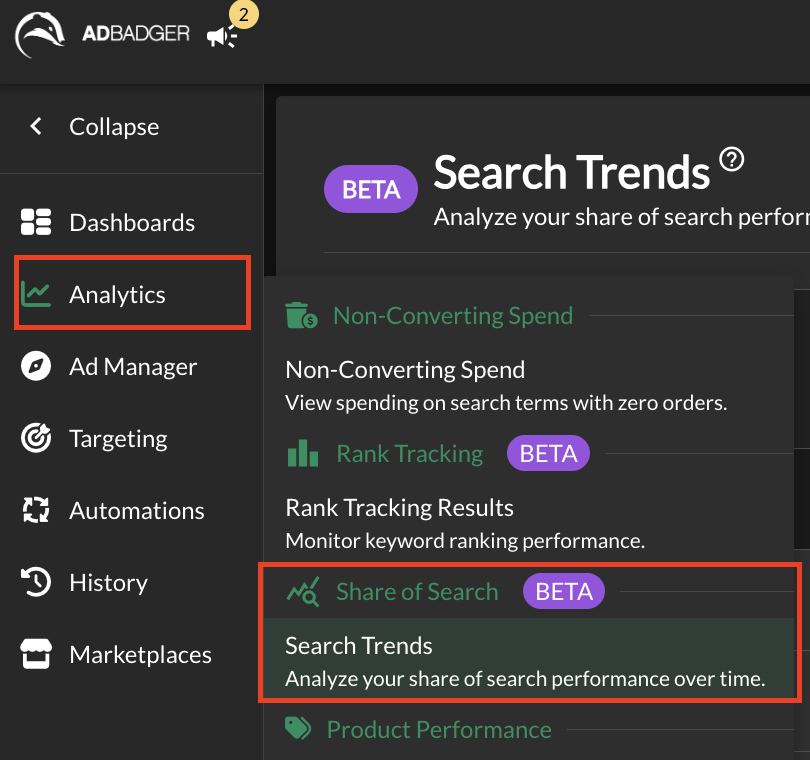
- Click Analytics in the left-hand menu.
- Select Share of Search (BETA) → Search Trends.
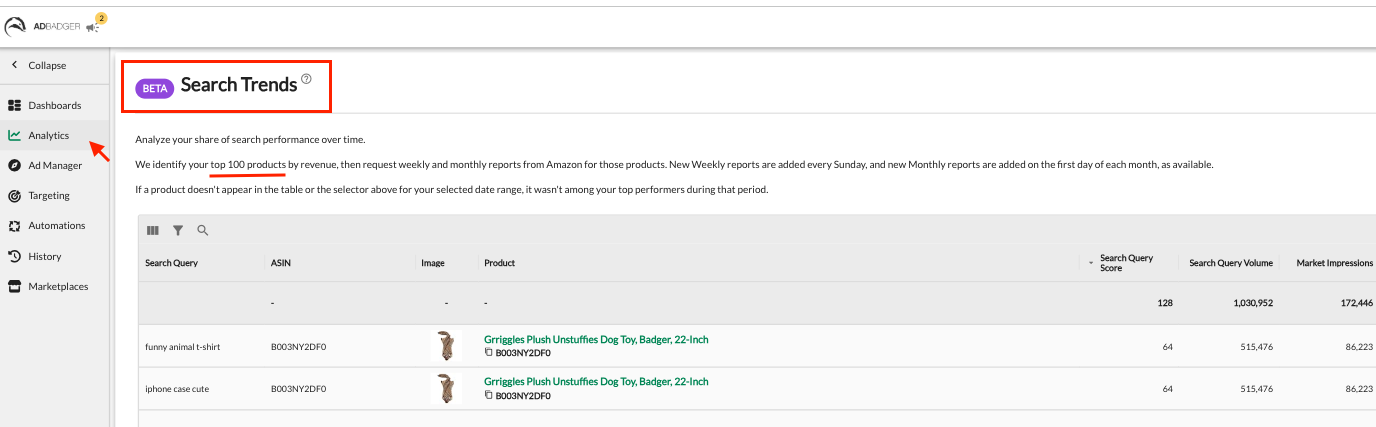
You’ll see the Search Trends (Beta) page with keyword-level performance tied to your top-performing products.
How It Works
Product Coverage
Search Trends automatically identifies your top 100 products by revenue
If a product doesn’t appear in the table or ASIN selector for a chosen date range, it means it was not among your top performers during that period.
Data Refresh Cadence
Weekly reports are added every Sunday.
Monthly reports are added on the first day of each month.
Viewing & Filtering Data
View data across All Products or select specific ASINs.
Use the date selector to compare performance across time periods.
Filter and search within the table to focus on specific queries or products.
Understanding the Table
Each row represents a search query–ASIN combination with the following key metrics:
Search Query – The customer keyword searched on Amazon
ASIN – The product receiving impressions
Product – Product title and image for quick identification
Search Query Score – Relative importance of the query based on Amazon SQP weighting
Search Query Volume – Total customer search volume for that keyword
Market Impressions – Total impressions across all advertisers and organic results
These metrics help you understand both demand (volume) and visibility (impressions) at the keyword level.
💡 Tips for Best Use
Get the most value out of Search Trends by using it as a decision-making tool, not just a reporting dashboard.
1️⃣ Review Trends Regularly (Not Just Once)
Search visibility changes quickly. Check Search Trends:
Monthly for strategic planning
After major bid, budget, or listing updates
During peak seasons or promotions
Consistent reviews help you spot issues before they impact revenue.
2️⃣ Start With All Products, Then Drill Down
Begin with All Products to understand overall brand visibility
Switch to specific ASINs to diagnose performance issues or wins
This top-down approach helps you prioritize where to focus first.
3️⃣ Use Time Comparisons to Validate Changes
Whenever you:
Adjust bids or budgets
Launch new campaigns
Optimize listings or pricing
Use time comparisons to confirm whether those changes actually improved your Share of Search.
4️⃣ Watch for Early Warning Signs
Look for:
Declining Brand Impression Share % on important keywords
Stable impressions but falling clicks
Strong clicks with weakening purchases
These signals often appear before revenue drops.
5️⃣ Prioritize High-Volume, Low-Share Keywords
High search volume + low Brand Impression Share usually means:
Competitors are winning visibility
There’s room to scale efficiently
These keywords are often your biggest growth opportunities.
6️⃣ Pair Search Trends With Listing Reviews
If metrics drop:
Low clicks → review images, titles, pricing
Low conversions → review bullets, A+ content, reviews
Search Trends tells you where the problem is—your listing helps fix it.
🚀 Why Share of Search Matters
Share of Search helps you see where you truly stand in Amazon search—not just how much you spend.
By understanding visibility trends over time, you can invest confidently in the keywords that grow your market share, revenue, and brand authority.
🚧 Beta Notes
Data comes directly from Amazon’s SQP reports via SP API
Some keywords may be excluded due to Amazon reporting thresholds
Metrics and availability may evolve during the Beta phase
Need Help?
💬 Reach out to our Support Team anytime through the Live Chat bubble in the lower-right corner of the tool.