
The Bid Engine is a unified dashboard that brings your entire bidding strategy into one clear view. By grouping Bids by Badger, Dayparting, and Manual management side-by-side, you can finally see the "big picture" of your account's automation health.
This view allows you to instantly audit your coverage—showing you exactly how many campaigns, keywords, and targets are being optimized versus how many are still being handled manually. It’s the fastest way to spot opportunities to scale your automation and ensure no campaign is left unoptimized.
Accessing the Bid Engine
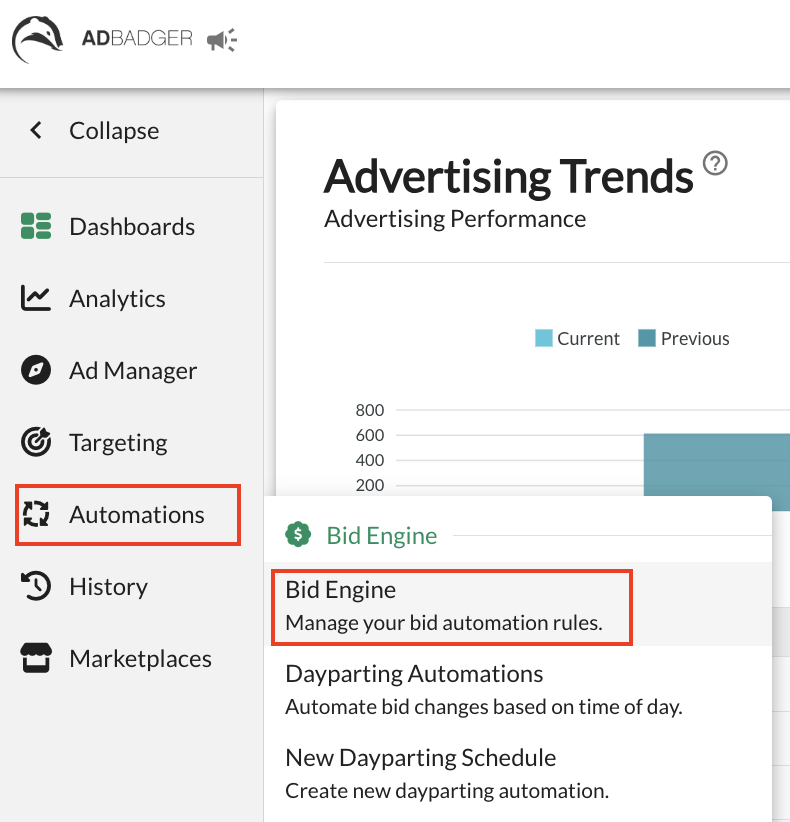
Navigate to the Automations tab in the left-hand sidebar.
Select Bid Engine from the dropdown menu.
Understanding the Strategy Pillars
The dashboard is divided into three sections, representing the different ways your bids are managed: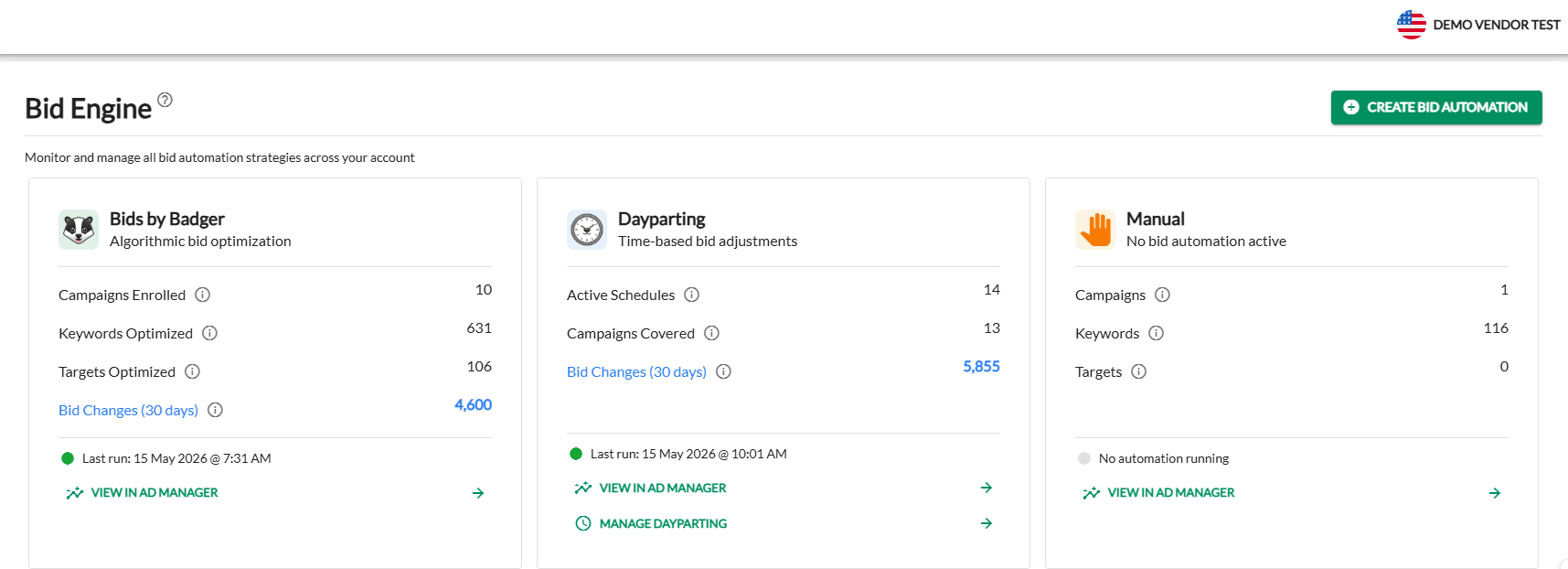
1. Bids by Badger (Algorithmic Optimization)
This section shows the reach of our proprietary bidding algorithm.
Campaigns Enrolled: The number of campaigns currently benefiting from autonomous bid optimization.
Keywords/Targets Optimized: The total count of individual targets the algorithm is managing.
Bid Changes (30 days): A high-level count of how many times the algorithm has adjusted your bids in the last month to hit your goals.
Last Run: Displays the exact timestamp of the algorithm's most recent optimization cycle.
2. Dayparting (Time-Based Adjustments)
This section tracks your custom scheduled bidding rules.
Active Schedules: How many unique dayparting rules you have created.
Campaigns Covered: The number of campaigns currently following a timed schedule.
Manage Dayparting: Click this link to jump directly to your schedule builder to add or edit rules.
3. Manual (No Automation Active)
This section highlights the "unmanaged" portion of your account.
Audit Opportunity: If you see high numbers here, it means those keywords and targets are not being touched by Bids by Badger or Dayparting. These are prime candidates for enrollment into an automation strategy to save you time and improve efficiency.
⚡ New Feature: Actionable Bidding Directly from the Dashboard!
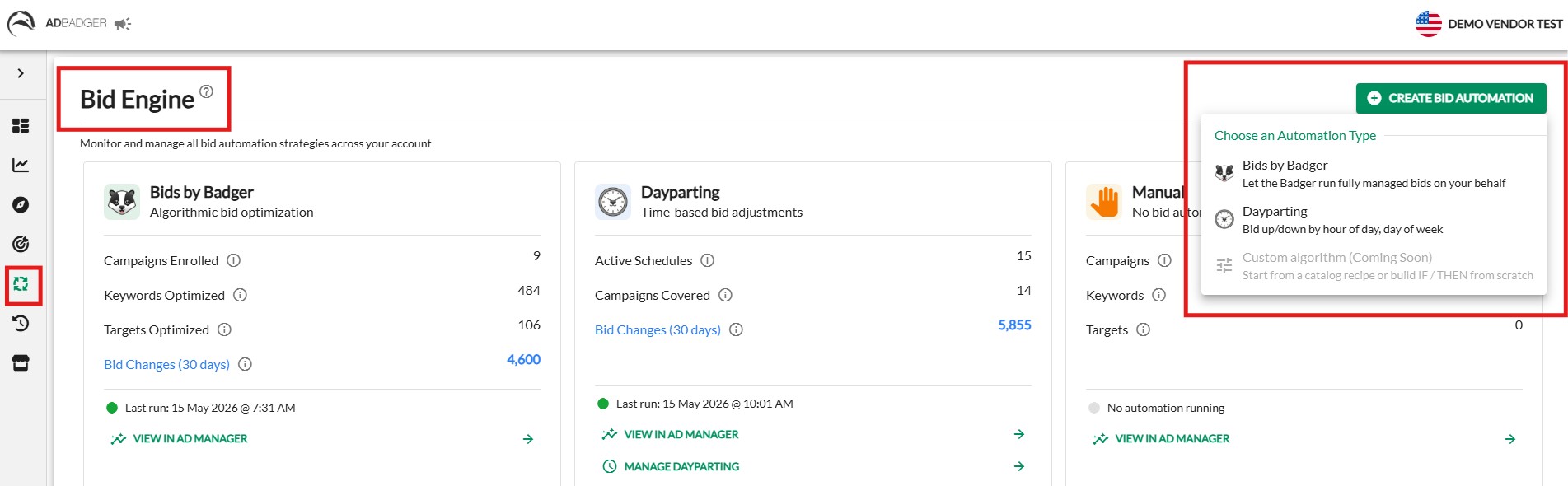
We’ve upgraded the Bid Engine by adding a "Create Bid Automation" dropdown menu in the top right corner, turning your high-level overview into an actionable workspace.
When you use the side-by-side cards to audit your account coverage, you don't have to leave the page to take action. If you spot campaigns running manually or ones that need a schedule adjustment, you can instantly launch a new strategy directly from this screen—keeping you completely in the zone and eliminating unnecessary menu hopping.
Dropdown Options:
Bids by Badger: Launch our autonomous, algorithmic bid optimization for your chosen campaigns.
Dayparting: Set up custom rules to raise or lower bids by hour of the day or day of the week.
How to Enroll Campaigns in Bids by Badger
If your audit reveals unmanaged campaigns in your Manual card, you can easily enroll them into our fully managed algorithmic bidding engine without leaving the dashboard:
Step 1: Select Campaigns
Click Create Bid Automation and select Bids by Badger. In the setup modal, click the green Select Campaign(s) button.
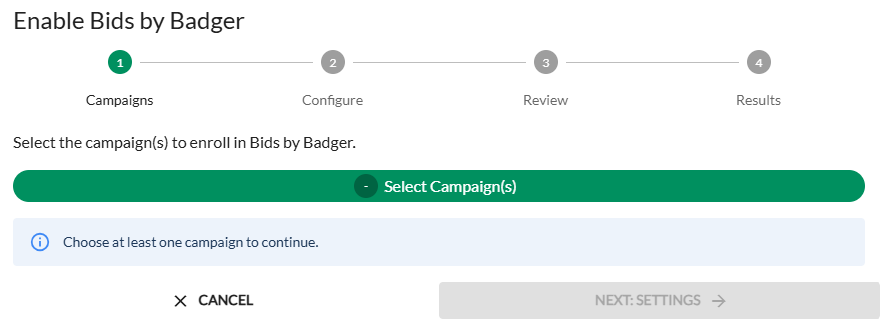
A side drawer will open allowing you to filter, search, and bulk-select the campaigns you want to automate. Click Save Selected Campaigns when done.
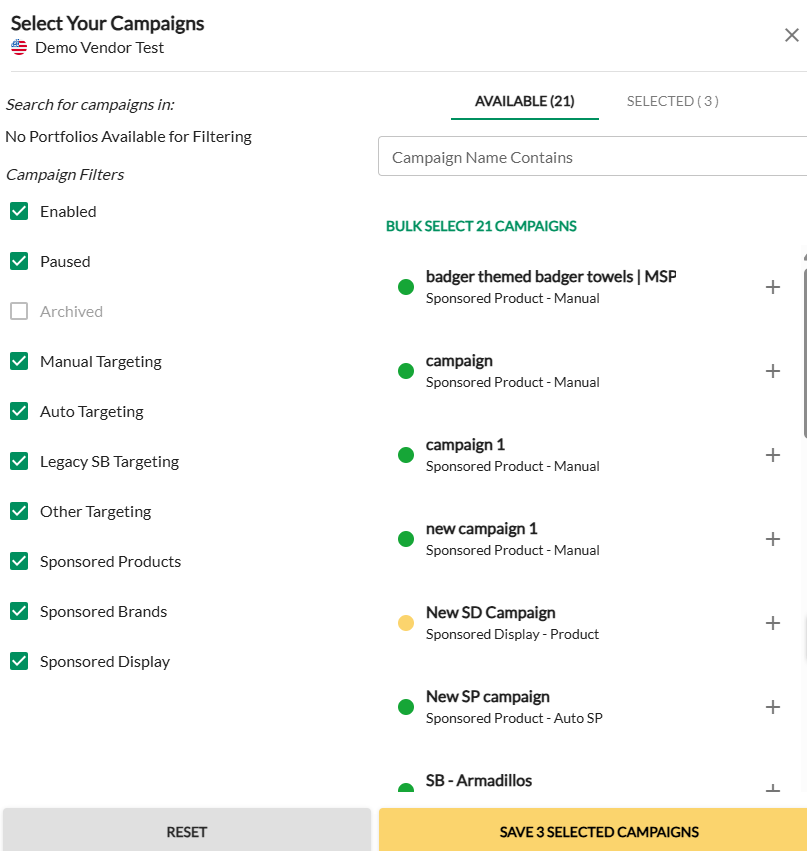
Step 2: Review Conflicts & Overrides
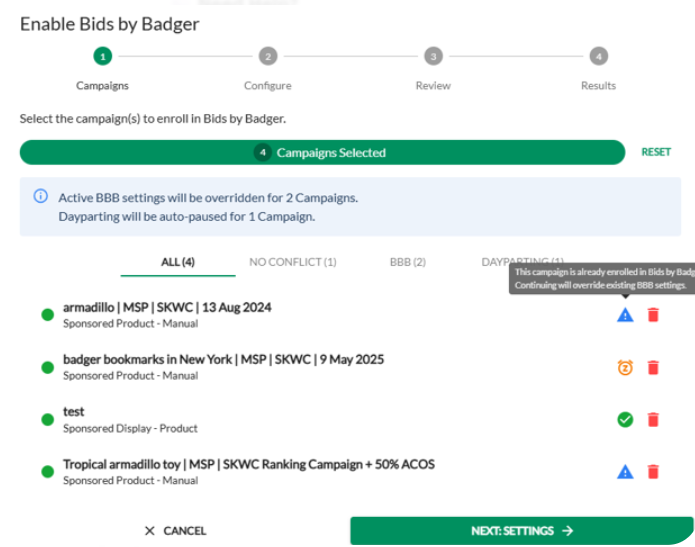
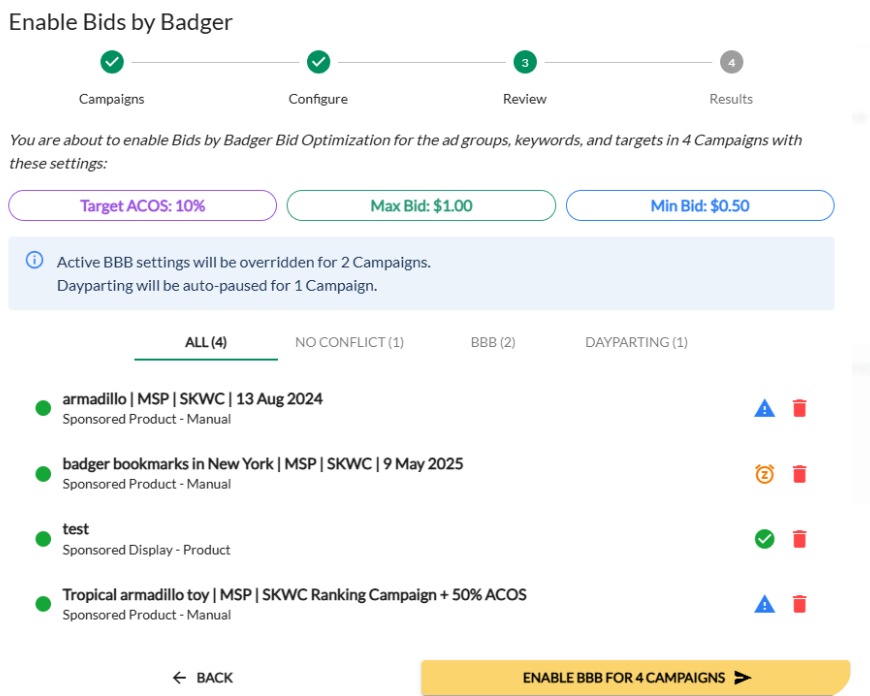
The wizard will analyze your selection and display helpful status indicators alongside your selected campaigns:
⚠️ Blue Warning Symbol: Indicates that the campaign is already enrolled elsewhere. Proceeding will override its existing settings.
⏰ Orange Clock Symbol: Indicates that a Dayparting rule is currently running on this campaign. Enrolling it will automatically pause Dayparting, as the core algorithm takes priority.
✔️ Green Checkmark: Indicates a clean campaign with no conflicting active automations.
🗑️ Trash Can Icon: If you accidentally selected the wrong campaign during bulk selection, click the red Trash Can icon next to its listing to remove it from the activation group before moving forward.
Step 3: Configure Your Targets
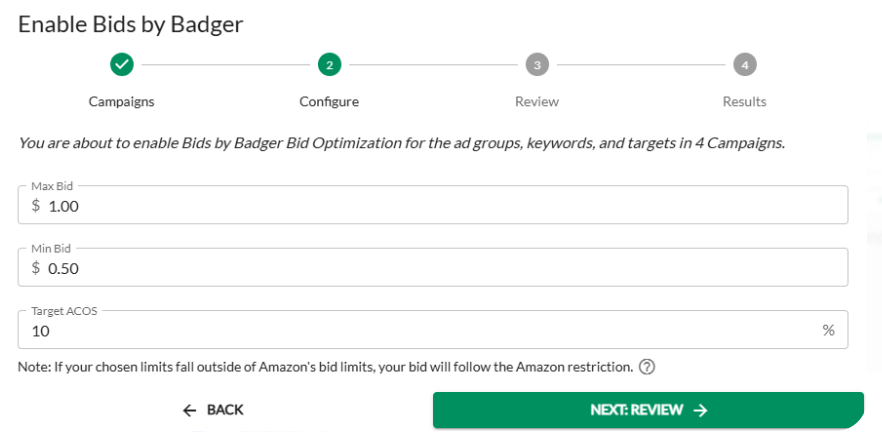
Click Next: Settings to set your performance guardrails:
Max Bid / Min Bid: Define the absolute ceiling and floor for your bids. The algorithm will dynamically adjust within these limits but will never cross them.
Target ACOS: Set your goal target percentage. Ad Badger uses this anchor to optimize your keyword and target bids daily.
Step 4: Finalize and Launch
Review your summary details, then click Enable BBB for Campaigns.
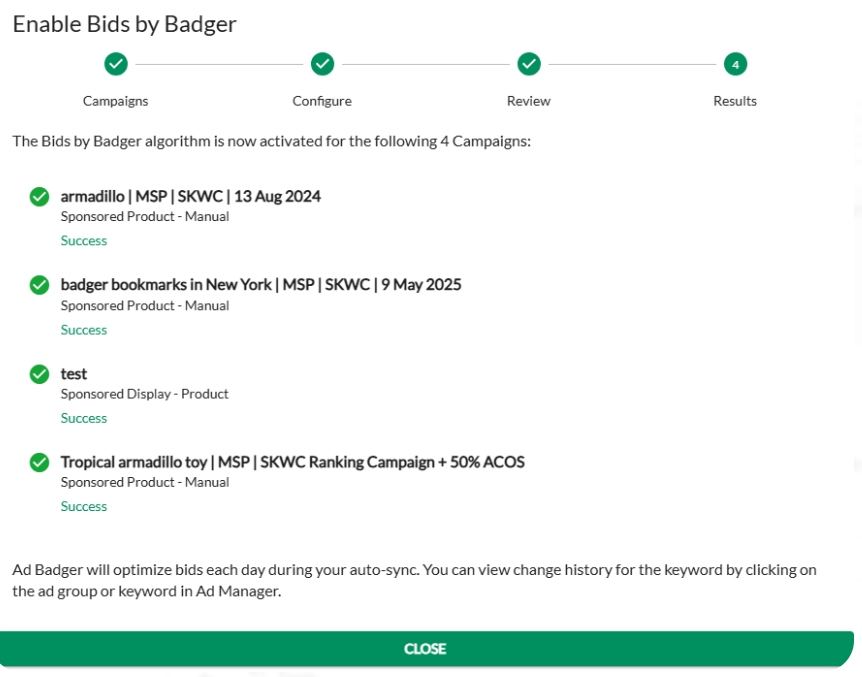
The system will confirm your activations with a green Success verification. Click Close to return to your updated dashboard.
How to Enroll Campaigns in Dayparting Automation
The setup process is broken down into three easy steps:
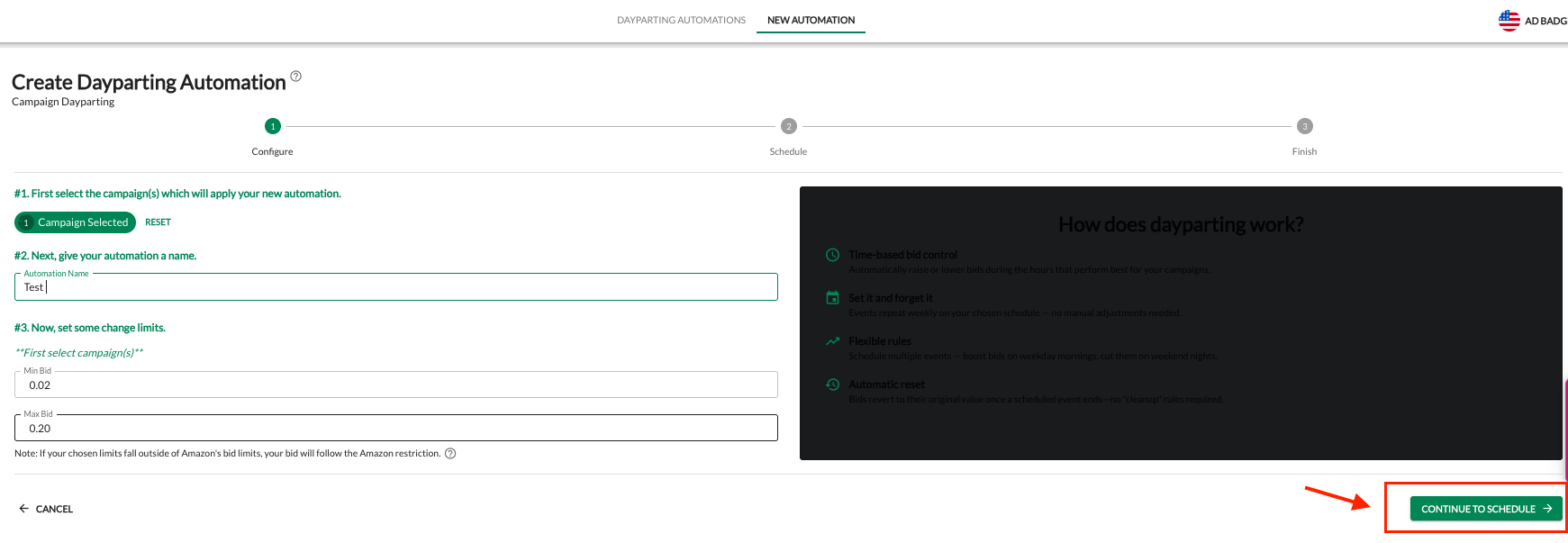
Step 1: Configure
Select Campaign(s): Choose the campaigns you wish to automate.
Name Your Automation: Give it a clear name (e.g., "Weekday Morning Boost").
Set Change Limits: Define your Min Bid and Max Bid. This acts as a safety net; Ad Badger will never push your bids outside of these boundaries.
Click Continue to Schedule.
Step 2: Schedule (Defining Your Events)
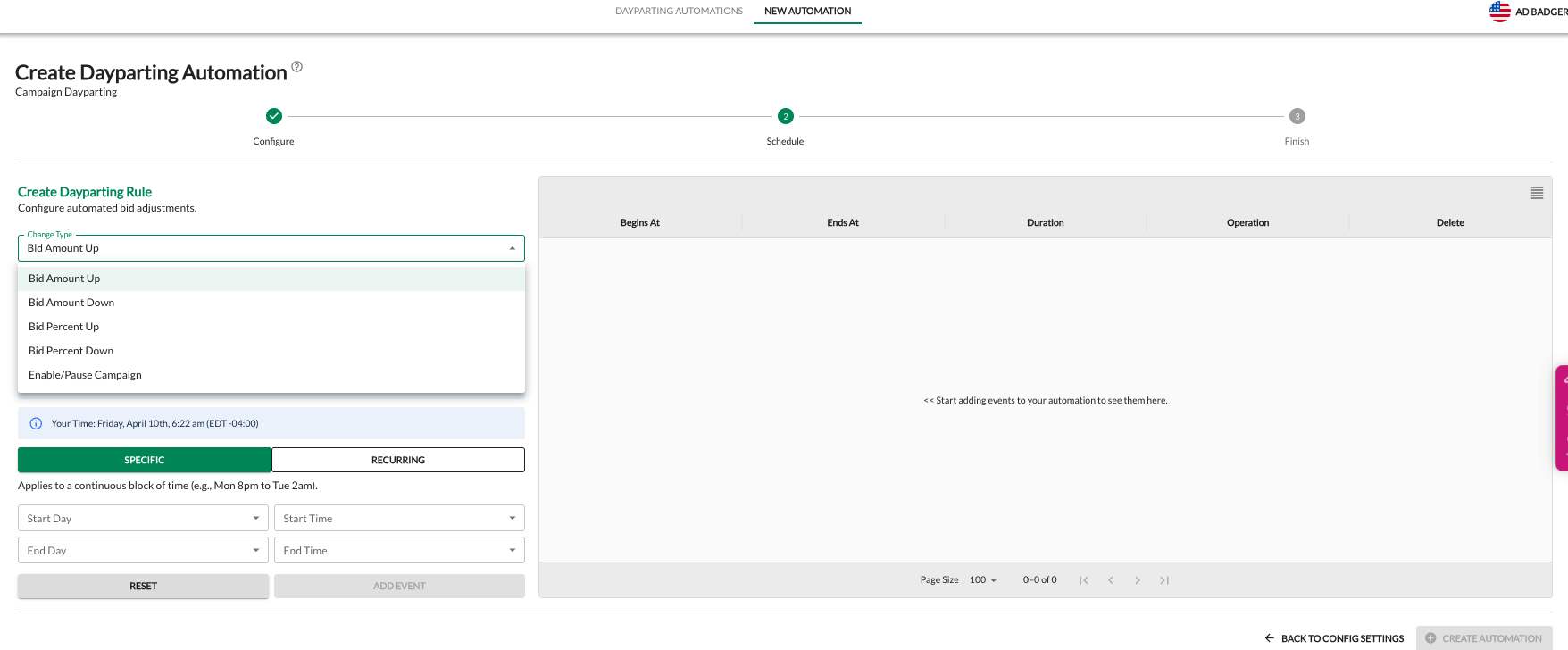
In this section, you create "Events" to tell Ad Badger exactly how to change your bids.
1. Choose Your Change Type:
Bid Amount Up/Down: Change the bid by a specific dollar amount (e.g., +$0.50).
Bid Percent Up/Down: Change the bid by a percentage (e.g., -20%).
Enable/Pause Campaign: Fully toggle the campaign on or off during specific times.
Why Use Dayparting?
Bid Control: Automatically raise bids during high-conversion hours and lower them when traffic is less likely to buy.
Set and Forget: Events repeat weekly based on your chosen schedule—no manual adjustments needed.
Automatic Reset: Bids revert to their original value once a scheduled event ends—no "cleanup" rules required.
💬 Need Help?
Reach out to our Support Team anytime through the Live Chat bubble in the lower-right corner of the tool.